


Modo nativo: use pastas e pilhas familiares do Dock para organizar apps, arquivos, pastas e links por projeto ou tarefa.

Pare de procurar no Dock.Abra o fluxo inteiro.
Agrupe seus itens frequentes e abra-os a qualquer momento pelo Dock ou widgets com um clique.
Comece gratuitamente. Requer macOS 14 ou posterior.
Dev Tools
Search apps, files, and folders⌘F
 Cursor
 Xcode
Xcode VS Code
 WebStorm
 Zed
Zed Sourcetree
README.mdOpens in Zed
design.psdOpens in Photoshop
Communication
Search apps, files, and folders⌘F
 Lark›
Lark› Discord›
 WeChat›
 Notion›
AI Assistants
Search apps, files, and folders⌘F
 ChatGPT
 Perplexity
 Arc
Arc Chrome
Hover over a group icon to tryEdição completa · Demonstração interativa
O QUE É O OTTERDOCK
Mantenha o Dock da Apple e adicione organização por fluxo
Otterdock é um organizador do Dock do macOS que aprimora o Dock em vez de substituí-lo. Você mantém o visual e o desempenho do Dock da Apple e escolhe o nível de organização necessário.
Modo avançado: abra grupos por clique ou hover opcional, use atalhos globais, escolha o app de cada arquivo, reordene itens e abra contextos completos.
Os widgets oferecem um ponto de entrada prático além do Dock. Posicione-os na área de trabalho ou Central de Notificações para abrir itens com um clique.
Start with a workflow
Organize projetos reais em grupos dedicados
Reúna aplicativos, arquivos, pastas e sites de cada projeto em um só lugar. Alterne fluxos de trabalho instantaneamente sem sobrecarregar sua área de trabalho ou o Dock.
Development projects
Keep your editor, terminal, project folder, and docs in one group so switching projects never means scanning the Dock.
Design handoffs
Keep Figma, assets, references, and the right opener ready together, so delivery takes one less search.
Focused work
Give writing, meetings, or study a clean set of entry points, then switch back when the task is done.
Core capabilities
Agrupe tudo o que precisa
Reúne aplicativos, arquivos, pastas e links da web em grupos dedicados no Dock. Abra menus rápidos para começar suas tarefas imediatamente.
One group for the whole workflow
Mix apps, files, folders, and web links in one group. Drop them in and keep moving.
Click or hover — your choiceFull
Pastas nativas do Dock não exigem permissão adicional de acessibilidade. A edição Direta Full requer Acessibilidade apenas para interceptar cliques no Dock e abrir itens por hover.
A keyboard-first way to openFull
Global hotkeys, popup search, arrow-key navigation, and ⌘1–9 quick launch.
Open every file with the right appPro · Full
Assign an opener per file; images, PDFs, and videos also get real previews.
Make every group easy to recognize
Use icon skins to separate workflows, then drag to keep the important items in reach.
Coloque seus itens frequentes em widgets
Abra itens individuais diretamente pelos widgets na área de trabalho ou Central de Notificações, em tamanhos pequeno, médio e grande.
Widgets da Área de Trabalho e Central de Notificações
Posicione na área de trabalho ou na Central de Notificações e clique em um item para abri-lo diretamente.
Ver o guia de configuração do widget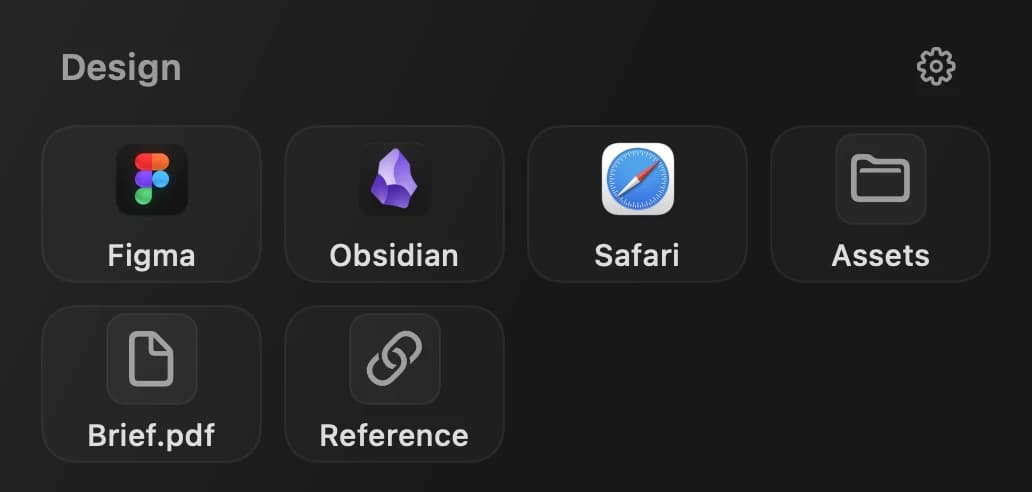
Por que funciona
Simples, privado e nativo
Otterdock remove uma fricção diária do Dock sem exigir que você mude seu jeito de trabalhar.
Local por padrão
Seus grupos e metadados de arquivos ficam no seu Mac.
Compra única
Sem assinatura. Compre uma vez e continue usando com atualizações.
Nativo do macOS
A edição Direta Full suporta macOS 14 ou superior em Macs com Intel e Apple Silicon. A edição da Mac App Store suporta macOS 14 ou superior em Macs com Apple Silicon (M1 ou posterior).
“A tidy Dock is a tidy mind. Otterdock turns a chaotic row of icons into organized workflow groups — so you spend less time searching and more time doing.”
Baixe o Otterdock para macOS
A versão gratuita inclui 2 grupos com até 8 itens por grupo.
Full Download
Direct · v1.1.3
Pastas nativas do Dock não exigem permissão adicional de acessibilidade. A edição Direta Full requer Acessibilidade apenas para interceptar cliques no Dock e abrir itens por hover.
Download .dmgRequires macOS 14.0 Sonoma or later
Mac App Store
App Store · v1.1.4
Versão Mac App Store: Distribuída e atualizada pela Apple, com pastas nativas do Dock e widgets.
Baixar na Mac App StoreRequer macOS 14 ou posterior e Apple Silicon (M1 ou posterior)
Escolha entre a versão direta com popups personalizados ou a da Mac App Store com pastas nativas do Dock. Ambas incluem widgets.
As compras e licenças Pro são independentes entre os canais Direto e Mac App Store.
Comparar ediçõesPreço
Comece grátis, Pro em compra única
O Otterdock é gratuito com até 2 grupos e 8 itens por grupo no macOS 14+, sem necessidade de conta. Faça o upgrade Pro a qualquer momento por US$ 6,99 em pagamento único (o preço pode variar por região).
Edição completa · Download direto
Edição completa · Pro
$6.99
compra única
- ✓All features + Pro skins
- ✓Hover-to-expand mode
- ✓Sparkle auto-updates
- ✓Priority email support
- ✓Use on up to 3 Macs
Compra única · Atualizações gratuitas
Payments secured byCreemMac App Store · v1.1.4
Mac App Store
Grátis
IAP Pro opcional de $6.99
- ✓Recursos principais: 2 grupos, 8 itens/grupo
- ✓Integração nativa de pastas no Dock
- ✓Atualizações pela App Store
- ✓Sandbox · Apple Silicon (M1 ou posterior)
Download gratuito. Pro ($6.99) desbloqueia grupos ilimitados e skins Pro via compra única no aplicativo.
Which Edition Is Right for You?
Free and Pro define your limits. App Store and Direct define how Otterdock integrates with macOS.
Comparar edições
| Feature | App Store | Direct | ||
|---|---|---|---|---|
| Free | Pro | Free | Pro | |
| Included in both editions | ||||
| Workflow groups | 2 groups | Included | 2 groups | Included |
| Items per group | 8 items | Included | 8 items | Included |
| Apps, files, folders & links | Included | Included | Included | Included |
| Widgets da Área de Trabalho e Central de Notificações | Included | Included | Included | Included |
| Drag-and-drop editing | Included | Included | Included | Included |
| In-group sorting | Included | Included | Included | Included |
| Pro icon skins | Not available | Included | Not available | Included |
| Edition differences | ||||
| Add groups to the Dock | Drag manually | Drag manually | Automatic | Automatic |
| Otterdock popup | Not available | Not available | Included | Included |
| Hover-to-expand | Not available | Not available | Included | Included |
| Global keyboard shortcuts | Not available | Not available | Included | Included |
| Per-file opening app | Not available | Not available | Not available | Included |
| Update channel | App Store | App Store | In-app | In-app |
| App sandbox | Sandboxed | Sandboxed | Outside sandbox | Outside sandbox |
Direct 1.1.3 · App Store 1.1.4
Histórico de versões
As atualizações são lançadas de forma independente por canal de distribuição.
Você pode estar se perguntando
O que é o Otterdock e o que ele faz?
O Otterdock é um organizador do Dock para macOS que reúne apps, arquivos, pastas e links em grupos. A versão direta conta com popups personalizados, expansão ao passar o cursor e atalhos globais; a versão da Mac App Store usa pastas nativas do Dock. Ambas suportam widgets na área de trabalho e Central de Notificações.
O que posso colocar em um grupo?
Apps, arquivos, pastas e links — todos no mesmo grupo. Você pode misturar tipos livremente: um grupo Design pode conter o Figma, uma pasta de projeto e um PDF de referência.
Preciso conceder permissões?
As pilhas nativas do Dock do macOS não precisam da permissão de Acessibilidade do Otterdock. A edição Direct solicita permissão de Acessibilidade para o pop-up personalizado no Dock e interações de hover. Os atalhos globais de grupo não necessitam dessa permissão. Escolha as pilhas nativas se não quiser conceder acesso de Acessibilidade.
O Otterdock coleta meus dados?
As configurações de grupos e caminhos completos de arquivos ficam salvos localmente no seu Mac. Na versão atual, as métricas opcionais não enviam nomes de grupos, itens, caminhos completos nem conteúdo de arquivos, e podem ser desativadas nos Ajustes.
Quais versões do macOS são compatíveis?
A edição Direta Full suporta macOS 14 ou superior em Macs com Intel e Apple Silicon. A edição da Mac App Store suporta macOS 14 ou superior em Macs com Apple Silicon (M1 ou posterior).
Quanto custa o Otterdock?
Ambas as edições podem ser baixadas gratuitamente (2 grupos, 8 itens cada); o Pro é uma compra única opcional de US$ 6,99 (licença direta da SaveTimeForFun ou compra interna na Mac App Store).
Como o Otterdock difere das pastas do Dock do macOS?
As pastas nativas do Dock permitem misturar documentos, subpastas, links da web e atalhos, mas gerenciá-los manualmente no Finder dá trabalho. O Otterdock oferece um editor visual de grupos e widgets no macOS 14 ou posterior para organizar seus fluxos com rapidez.
Como solicito um reembolso?
Se você comprou no site oficial, entre em contato pelo e-mail [email protected] e processaremos o pedido de acordo com nossa política publicada. Para compras na Mac App Store, solicite em reportaproblem.apple.com para análise direta pela Apple.
Can I open groups with keyboard shortcuts?
Sim, a versão direta permite configurar atalhos globais para cada grupo e acioná-los de qualquer aplicativo. Você pode personalizar as combinações de teclas para cada grupo nos Ajustes.
Quem processa os pagamentos do Otterdock?
Os pagamentos da versão direta são processados pela Creem como Merchant of Record, enquanto as transações da Mac App Store são gerenciadas pela Apple. Seus dados de grupos e caminhos permanecem salvos localmente no seu Mac.